Access SFTP server as a drive in Windows Explorer
Drive letter for SFTP server
Rebex Drive allows you to mount an SFTP server as a Windows drive. It appears as a new drive letter in Windows Explorer. Access remote files securely from any application without a dedicated SFTP client.
Works with any application
Any application that can access files on the local disk will be able to use files on the SFTP server too.
Multiple connections
You can have as many SFTP connection as you want (as far as you have available drive letters).
Fine-tuned SFTP / SSH security
SSH security works out of the box with safe defaults, so you can use the client securely without knowing the low-level details.
If needed, you can still fine-tune authentication, use SSH agents such as OpenSSH or Pageant, and adjust security settings to match your policy.
20+ years of improvements included
The Rebex Drive SFTP subsystem is based on the state-of-the-art Rebex SFTP .NET library, which we have been developing since 2006. In 2018, we launched the Buru SFTP Server. Over more than 20 years, we have gained a wealth of experience with SFTP servers that behave unusually and with edge cases of the SFTP protocol, and we have eliminated many shortcomings.
For you, this means that it simply works, because we improved and eliminated most potential issues years ago.
How to connect SFTP server as Windows drive
1. Get Rebex Drive application
Download and install Rebex Drive.
2. Add new drive
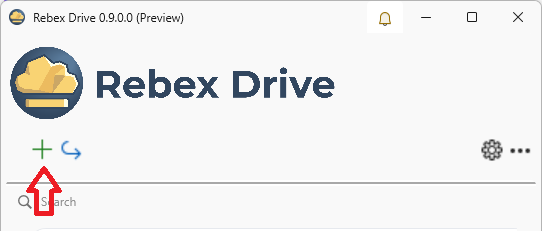
Run the application. Click on Plus button on the top left corner
3. Configure the SFTP server connection
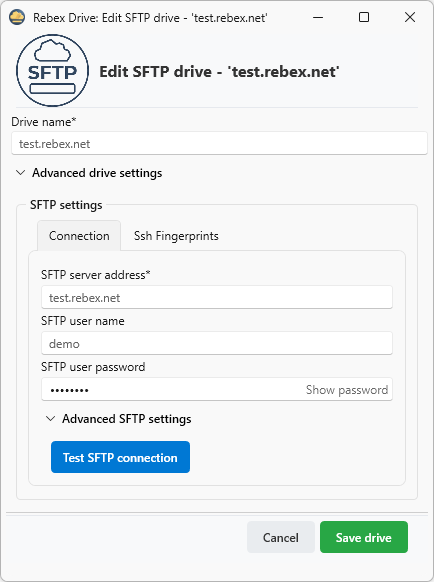
To configure the server connection, enter the host name, port, user name, and password for your SSH/SFTP server.
If you do not have a server available right now, you can try the setup with our public test server:
test.rebex.net, user name demo, password password.
4. Done
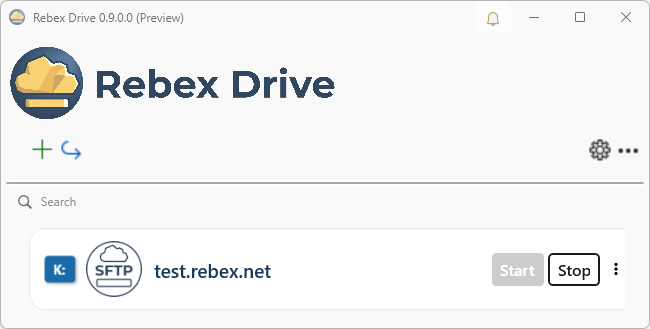
Hit the Save drive button and you are done. You can use files stored on the SFTP server as if they were on your local disk.'
More info
What is SFTP?
SFTP (SSH File Transfer Protocol) is the industry standard for secure remote file access. All data is encrypted in transit using SSH, making it the preferred choice for accessing files on Linux, Unix, and cloud servers.
Compatibility
Rebex Drive runs on Windows 10, 11 and Windows Server 2016 or later.
Rebex Drive connects to a wide range of SFTP servers, including:
- OpenSSH
- Popular NAS devices (Synology, QNAP, and others)
- Cloud storage with SFTP interface (AWS Transfer Family, Azure SFTP, and others)
Connection Features
- Password and SSH key authentication
- Support for modern SSH ciphers and algorithms
- Host key verification (known hosts)