
Related Rebex software
-
 Buru SFTP Server for Windows
Full featured SFTP/FTP/SSH server
-
 Rebex Tiny SFTP Server
Free simple SFTP server
-
 Rebex Tiny Ftp Server
Free simple FTP server
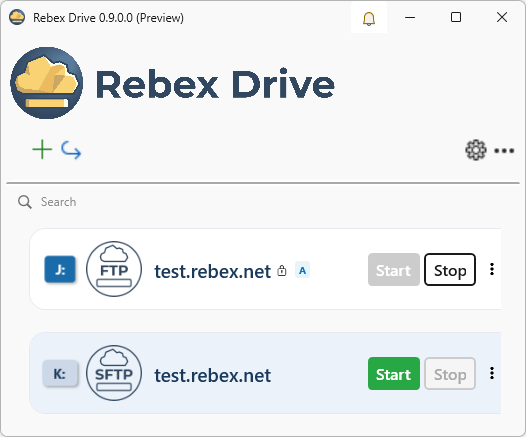
Rebex Drive
Mount remote storage as a Windows network drive
Connect to SFTP, FTP/FTPS, or WebDAV servers and access remote files directly from Windows Explorer or any application - no custom client software needed. Just map a drive letter and work with remote files as if they were local.
Why Rebex Drive?
Seamless Windows integration
Remote and cloud storage appears as a regular network drive in Windows Explorer and every other application. Open, edit, copy, and move files without any special tools or plugins.
System requirements
Windows 11 (recommended) or Windows 10.
Connect via standard protocols
Supports SFTP, FTP and FTPS, and WebDAV. Works with any server that speaks these protocols — Linux, Windows, NAS devices, or cloud storage.
Free and Pro editions
Rebex Drive is currently in preview and free to use. Once released, a Free edition will be available for personal and non-commercial use, and a Pro edition will cover commercial use cases.
Features
SFTP
SSH File Transfer Protocol — the industry standard for secure remote file access. All data is encrypted in transit. Compatible with OpenSSH and other standard SFTP servers.
FTP & FTPS
Classic File Transfer Protocol with optional TLS encryption (FTPS). Connects to legacy FTP servers and modern FTPS deployments alike.
WebDAV
HTTP/HTTPS-based file access. Works with Nextcloud, ownCloud, and any other WebDAV-compatible server.
Works with any application
The mapped drive is visible system-wide. Open remote files in Notepad, Visual Studio, or any other tool — exactly as you would with a local disk.
Multiple simultaneous connections
Map several remote servers at once, each as its own drive letter - work with all of them in parallel, no disconnecting required.
Quick setup
Install Rebex Drive, enter the server address and credentials, pick a drive letter. No complex configuration required.