Basic upload and download
Download source code for demo application: 02-basic.zip
In this lab you'll learn how to write simple .NET console application that will upload and download files to SFTP server.
The code is not platform or tooling specific, but I use Windows 11 and Visual Studio 2026 for the demos. I'm using the current latest RTM versions of .NET 10 and Rebex SFTP 8.0.
Install NuGet package
Create a new .NET console application named Demo.BasicFileTransfer.
Install NuGet package Rebex.Sftp. Either use the following command in Package Manager Console:
Install-Package Rebex.Sftp
or the following command in terminal:
dotnet add package Rebex.Sftp
Connect to the server
Add the following code to Program.cs:
using Rebex.Net;

const string ServerName = "localhost";
const string UserName = "tester";
const string Password = "password";

Rebex.Licensing.Key = "Get trial key at https://www.rebex.net/support/trial/";

using var ftp = new Sftp();

Console.Write("Connecting to SFTP server...");
await ftp.ConnectAsync(ServerName);
Console.WriteLine("OK");

Console.Write($"Logging in user {UserName}...");
await ftp.LoginAsync(UserName, Password);
Console.WriteLine("OK");

Console.Write("Disconnecting...");
await ftp.DisconnectAsync();
Console.WriteLine("OK");
This code will try to connect, authenticate using username and password and disconnect. This is the basic skeleton you'll use for working with SFTP server.
Run the application. It will print the following messages:
Connecting to SFTP server...OK
Logging in user tester...OK
Disconnecting...OK
If you are using Rebex Tiny SFTP server, you will see the actions in program window:
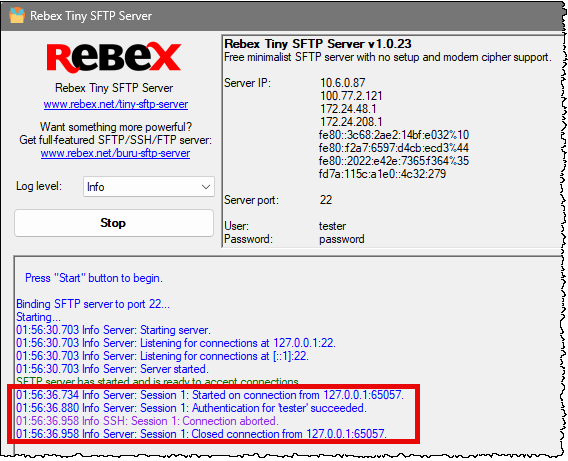
We are using async API here. There are also synchronous methods like Connect, Login and Disconnect if you need them. But .NET is designed for async/await by default, so we are using async methods everywhere, even if it does not make much sense in this simple console app.
You successfully connected to the server using username and password authentication, but in a very insecure manner. You did not verify the server public key, which opens a way for various attacks. Attacker can redirect your connection to server they control and obtain your username and password this way.
To mitigate this problem, you have to verify that the server public key is as expected.
Basic error handling
Murphy's law says that everything that could wrong will go wrong. Therefore we need to add exception handling early.
The library will throw the SftpException if something goes wrong. Basic information about what exactly was wrong can be found mainly in the Status property. There are other useful properties available, see documentation for more info.
Modify the code to add exception handling around the main code. Separately handle typical problems like nonexisting server etc.
using Rebex.Net;

const string ServerName = "localhost";
const string UserName = "tester";
const string Password = "password";

Rebex.Licensing.Key = "Get trial key at https://www.rebex.net/support/trial/";

using var ftp = new Sftp();

try {
    // This code may fail because of external factors
    // (e.g. server not running, wrong credentials, network issues, etc.)
    Console.Write("Connecting to SFTP server...");
    await ftp.ConnectAsync(ServerName);
    Console.WriteLine("OK");

    Console.Write($"Logging in user {UserName}...");
    await ftp.LoginAsync(UserName, Password);
    Console.WriteLine("OK");

    Console.Write("Disconnecting...");
    await ftp.DisconnectAsync();
    Console.WriteLine("OK");
} catch (SftpException sex) {
    // Handle different types of SFTP exceptions separately
    // to provide more specific error messages.
    switch (sex.Status) {
        case SftpExceptionStatus.ConnectFailure:
            Console.WriteLine("Can't connect!");
            break;
        case SftpExceptionStatus.SocketError:
            Console.WriteLine("Socket error!");
            break;
        case SftpExceptionStatus.NameResolutionFailure:
            Console.WriteLine("Can't resolve server name!");
            break;
        case SftpExceptionStatus.Timeout:
            Console.WriteLine("Connection timed out!");
            break;
        default:
            Console.WriteLine($"Failed: {sex.Status}!");
            Console.WriteLine(sex.Message);
            break;
    }
} catch (Exception ex) {
    // Handle any other unexpected exceptions that may occur.
    Console.WriteLine("Failed!");
    Console.WriteLine(ex.Message);
}
Test the following error conditions:
- Server is not running
- Non-existing server name
- Invalid user name or password
The application should handle them correctly by displaying the right error message.
Default timeout is 60 seconds, which is quite large value. You can change it to shorter value for testing purposes:
using Rebex.Net;

const string ServerName = "localhost";
const string UserName = "tester";
const string Password = "password";

Rebex.Licensing.Key = "Get trial key at https://www.rebex.net/support/trial/";

using var ftp = new Sftp();

// Set a short timeout to demonstrate the error handling.
// (default is 60 seconds)
ftp.Timeout = 5000; // 5000 ms = 5 seconds

try {
    // This code may fail because of external factors
    // (e.g. server not running, wrong credentials, network issues, etc.)
    Console.Write("Connecting to SFTP server...");
    await ftp.ConnectAsync(ServerName);
    Console.WriteLine("OK");

    Console.Write($"Logging in user {UserName}...");
    await ftp.LoginAsync(UserName, Password);
    Console.WriteLine("OK");

    Console.Write("Disconnecting...");
    await ftp.DisconnectAsync();
    Console.WriteLine("OK");
} catch (SftpException sex) {
    // Handle different types of SFTP exceptions separately
    // to provide more specific error messages.
    switch (sex.Status) {
        case SftpExceptionStatus.ConnectFailure:
            Console.WriteLine("Can't connect!");
            break;
        case SftpExceptionStatus.SocketError:
            Console.WriteLine("Socket error!");
            break;
        case SftpExceptionStatus.NameResolutionFailure:
            Console.WriteLine("Can't resolve server name!");
            break;
        case SftpExceptionStatus.Timeout:
            Console.WriteLine("Connection timed out!");
            break;
        default:
            Console.WriteLine($"Failed: {sex.Status}!");
            Console.WriteLine(sex.Message);
            break;
    }
} catch (Exception ex) {
    // Handle any other unexpected exceptions that may occur.
    Console.WriteLine("Failed!");
    Console.WriteLine(ex.Message);
}
Now change server name to www.example.com, which is name of valid server, which will timeout (at time of writing). Verify that the error is handled correctly.
Change server name back to localhost to continue testing.
Upload files
Next we will try to upload some files from local computer to remote one. Modify the code in Program.cs to upload files to remote server. If files exists, they would be overwritten:
using Rebex.Net;

const string ServerName = "localhost";
const string UserName = "tester";
const string Password = "password";
const string UploadDirectory = @"C:\Windows\Web\Wallpaper\ThemeA";

Rebex.Licensing.Key = "Get trial key at https://www.rebex.net/support/trial/";

using var ftp = new Sftp();

// Set a short timeout to demonstrate the error handling.
// (default is 60 seconds)
ftp.Timeout = 5000; // 5000 ms = 5 seconds

try {
    // This code may fail because of external factors
    // (e.g. server not running, wrong credentials, network issues, etc.)
    Console.Write("Connecting to SFTP server...");
    await ftp.ConnectAsync(ServerName);
    Console.WriteLine("OK");

    Console.Write($"Logging in user {UserName}...");
    await ftp.LoginAsync(UserName, Password);
    Console.WriteLine("OK");

    // Get all files in the upload directory and upload them to the SFTP server.
    var files = Directory.GetFiles(UploadDirectory);
    foreach (var file in files) {
        var fileName = Path.GetFileName(file);
        Console.Write($"Uploading {fileName}...");
        await ftp.PutFileAsync(file, fileName);
        Console.WriteLine("OK");
    }

    Console.Write("Disconnecting...");
    await ftp.DisconnectAsync();
    Console.WriteLine("OK");
} catch (SftpException sex) {
    // Handle different types of SFTP exceptions separately
    // to provide more specific error messages.
    switch (sex.Status) {
        case SftpExceptionStatus.ConnectFailure:
            Console.WriteLine("Can't connect!");
            break;
        case SftpExceptionStatus.SocketError:
            Console.WriteLine("Socket error!");
            break;
        case SftpExceptionStatus.NameResolutionFailure:
            Console.WriteLine("Can't resolve server name!");
            break;
        case SftpExceptionStatus.Timeout:
            Console.WriteLine("Connection timed out!");
            break;
        default:
            Console.WriteLine($"Failed: {sex.Status}!");
            Console.WriteLine(sex.Message);
            break;
    }
} catch (Exception ex) {
    // Handle any other unexpected exceptions that may occur.
    Console.WriteLine("Failed!");
    Console.WriteLine(ex.Message);
}
The path C:\Windows\Web\Wallpaper\ThemeA points to a folder with some default desktop wallpapers. You may change it to some other path with reasonable amount of data.
The PutFileAsync method has multiple overloads. We are using the easiest one that works with file paths. But we can upload files from different folder by directly working with their streams. It may come handy when uploaded data are not ready as files, you don't have to save them to disk.
using Rebex.Net;

const string ServerName = "localhost";
const string UserName = "tester";
const string Password = "password";
const string UploadDirectory = @"C:\Windows\Web\Wallpaper\ThemeA";

Rebex.Licensing.Key = "Get trial key at https://www.rebex.net/support/trial/";

using var ftp = new Sftp();

// Set a short timeout to demonstrate the error handling.
// (default is 60 seconds)
ftp.Timeout = 5000; // 5000 ms = 5 seconds

try {
    // This code may fail because of external factors
    // (e.g. server not running, wrong credentials, network issues, etc.)
    Console.Write("Connecting to SFTP server...");
    await ftp.ConnectAsync(ServerName);
    Console.WriteLine("OK");

    Console.Write($"Logging in user {UserName}...");
    await ftp.LoginAsync(UserName, Password);
    Console.WriteLine("OK");

    // Get all files in the upload directory and upload them to the SFTP server.
    var files = Directory.GetFiles(UploadDirectory);
    foreach (var file in files) {
        var fileName = Path.GetFileName(file);
        Console.Write($"Uploading {fileName}...");
        using var fileStream = File.OpenRead(file);
        await ftp.PutFileAsync(fileStream, fileName);

        Console.WriteLine("OK");
    }

    Console.Write("Disconnecting...");
    await ftp.DisconnectAsync();
    Console.WriteLine("OK");
} catch (SftpException sex) {
    // Handle different types of SFTP exceptions separately
    // to provide more specific error messages.
    switch (sex.Status) {
        case SftpExceptionStatus.ConnectFailure:
            Console.WriteLine("Can't connect!");
            break;
        case SftpExceptionStatus.SocketError:
            Console.WriteLine("Socket error!");
            break;
        case SftpExceptionStatus.NameResolutionFailure:
            Console.WriteLine("Can't resolve server name!");
            break;
        case SftpExceptionStatus.Timeout:
            Console.WriteLine("Connection timed out!");
            break;
        default:
            Console.WriteLine($"Failed: {sex.Status}!");
            Console.WriteLine(sex.Message);
            break;
    }
} catch (Exception ex) {
    // Handle any other unexpected exceptions that may occur.
    Console.WriteLine("Failed!");
    Console.WriteLine(ex.Message);
}
List files and directories
The GetListAsync method will list contents of current remote directory. It will return names of files, directories and other items the remote server may offer.
It returns collection of SftpItem instances. This class has bunch of useful properties. For now, we are interested only in its type (usually file or directory, which can be tested using IsFile and IsDirectory properties) and size (the Length property).
Change the code in Program.cs to list items in the root directory and print their information:
using Rebex.Net;

const string ServerName = "localhost";
const string UserName = "tester";
const string Password = "password";
const string UploadDirectory = @"C:\Windows\Web\Wallpaper\ThemeA";

Rebex.Licensing.Key = "Get trial key at https://www.rebex.net/support/trial/";

using var ftp = new Sftp();

// Set a short timeout to demonstrate the error handling.
// (default is 60 seconds)
ftp.Timeout = 5000; // 5000 ms = 5 seconds

try {
    // This code may fail because of external factors
    // (e.g. server not running, wrong credentials, network issues, etc.)
    Console.Write("Connecting to SFTP server...");
    await ftp.ConnectAsync(ServerName);
    Console.WriteLine("OK");

    Console.Write($"Logging in user {UserName}...");
    await ftp.LoginAsync(UserName, Password);
    Console.WriteLine("OK");

    // Get all files in the upload directory and upload them to the SFTP server.
    var files = Directory.GetFiles(UploadDirectory);
    foreach (var file in files) {
        var fileName = Path.GetFileName(file);
        Console.Write($"Uploading {fileName}...");
        using var fileStream = File.OpenRead(file);
        await ftp.PutFileAsync(fileStream, fileName);
        Console.WriteLine("OK");
    }

    // Get list of all items on the SFTP server and print their names and sizes.
    Console.Write("Getting list of items on the SFTP server...");
    var items = await ftp.GetListAsync();
    Console.WriteLine($"OK, {items.Count} items");

    // Print the name and size of each item on the SFTP server.
    foreach (var item in items) {
        if (item.IsDirectory) {
            Console.WriteLine($"  {item.Name} (directory)");
        } else if (item.IsFile) {
            Console.WriteLine($"  {item.Name} ({item.Length} bytes)");
        } else {
            Console.WriteLine($"  {item.Name} ({item.Type})");
        }
    }

    Console.Write("Disconnecting...");
    await ftp.DisconnectAsync();
    Console.WriteLine("OK");
} catch (SftpException sex) {
    // Handle different types of SFTP exceptions separately
    // to provide more specific error messages.
    switch (sex.Status) {
        case SftpExceptionStatus.ConnectFailure:
            Console.WriteLine("Can't connect!");
            break;
        case SftpExceptionStatus.SocketError:
            Console.WriteLine("Socket error!");
            break;
        case SftpExceptionStatus.NameResolutionFailure:
            Console.WriteLine("Can't resolve server name!");
            break;
        case SftpExceptionStatus.Timeout:
            Console.WriteLine("Connection timed out!");
            break;
        default:
            Console.WriteLine($"Failed: {sex.Status}!");
            Console.WriteLine(sex.Message);
            break;
    }
} catch (Exception ex) {
    // Handle any other unexpected exceptions that may occur.
    Console.WriteLine("Failed!");
    Console.WriteLine(ex.Message);
}
Run the application. It will print list of all files (including the newly uploaded ones).
Create a directory in the SFTP server data folder and put some files there. Verify that the code sees the directory, but not (for now) the files within.
We can print list of files and directories on server recursively:
using Rebex.Net;

const string ServerName = "localhost";
const string UserName = "tester";
const string Password = "password";
const string UploadDirectory = @"C:\Windows\Web\Wallpaper\ThemeA";

Rebex.Licensing.Key = "Get trial key at https://www.rebex.net/support/trial/";

using var ftp = new Sftp();

// Set a short timeout to demonstrate the error handling.
// (default is 60 seconds)
ftp.Timeout = 5000; // 5000 ms = 5 seconds

try {
    // This code may fail because of external factors
    // (e.g. server not running, wrong credentials, network issues, etc.)
    Console.Write("Connecting to SFTP server...");
    await ftp.ConnectAsync(ServerName);
    Console.WriteLine("OK");

    Console.Write($"Logging in user {UserName}...");
    await ftp.LoginAsync(UserName, Password);
    Console.WriteLine("OK");

    // Get all files in the upload directory and upload them to the SFTP server.
    var files = Directory.GetFiles(UploadDirectory);
    foreach (var file in files) {
        var fileName = Path.GetFileName(file);
        Console.Write($"Uploading {fileName}...");
        using var fileStream = File.OpenRead(file);
        await ftp.PutFileAsync(fileStream, fileName);
        Console.WriteLine("OK");
    }

    // Get list of all items on the SFTP server and print their names and sizes.
    Console.Write("Getting list of items on the SFTP server...");
    var items = await ftp.GetListAsync();
    Console.WriteLine($"OK, {items.Count} items");

    // Print the directory tree of the SFTP server recursively.
    async Task PrintDirectoryTree(SftpItemCollection items, string indent = "") {
        foreach (var item in items) {
            if (item.IsDirectory) {
                Console.WriteLine($"  {indent}{item.Name} (directory)");
                var subItems = await ftp.GetListAsync(item.Path);
                await PrintDirectoryTree(subItems, indent + "  ");
            } else if (item.IsFile) {
                Console.WriteLine($"  {indent}{item.Name} ({item.Length} bytes)");
            } else {
                Console.WriteLine($"  {indent}{item.Name} ({item.Type})");
            }
        }
    }
    await PrintDirectoryTree(items);

    Console.Write("Disconnecting...");
    await ftp.DisconnectAsync();
    Console.WriteLine("OK");
} catch (SftpException sex) {
    // Handle different types of SFTP exceptions separately
    // to provide more specific error messages.
    switch (sex.Status) {
        case SftpExceptionStatus.ConnectFailure:
            Console.WriteLine("Can't connect!");
            break;
        case SftpExceptionStatus.SocketError:
            Console.WriteLine("Socket error!");
            break;
        case SftpExceptionStatus.NameResolutionFailure:
            Console.WriteLine("Can't resolve server name!");
            break;
        case SftpExceptionStatus.Timeout:
            Console.WriteLine("Connection timed out!");
            break;
        default:
            Console.WriteLine($"Failed: {sex.Status}!");
            Console.WriteLine(sex.Message);
            break;
    }
} catch (Exception ex) {
    // Handle any other unexpected exceptions that may occur.
    Console.WriteLine("Failed!");
    Console.WriteLine(ex.Message);
}
Download files
The simplest way to download files is to use the GetFileAsync method. It will download a file to local path. To test it, modify the code in Program.cs so it will download every file with .jpg extension to desktop:
using Rebex.Net;

const string ServerName = "localhost";
const string UserName = "tester";
const string Password = "password";
const string UploadDirectory = @"C:\Windows\Web\Wallpaper\ThemeA";

Rebex.Licensing.Key = "Get trial key at https://www.rebex.net/support/trial/";

using var ftp = new Sftp();

// Set a short timeout to demonstrate the error handling.
// (default is 60 seconds)
ftp.Timeout = 5000; // 5000 ms = 5 seconds

try {
    // This code may fail because of external factors
    // (e.g. server not running, wrong credentials, network issues, etc.)
    Console.Write("Connecting to SFTP server...");
    await ftp.ConnectAsync(ServerName);
    Console.WriteLine("OK");

    Console.Write($"Logging in user {UserName}...");
    await ftp.LoginAsync(UserName, Password);
    Console.WriteLine("OK");

    // Get all files in the upload directory and upload them to the SFTP server.
    var files = Directory.GetFiles(UploadDirectory);
    foreach (var file in files) {
        var fileName = Path.GetFileName(file);
        Console.Write($"Uploading {fileName}...");
        using var fileStream = File.OpenRead(file);
        await ftp.PutFileAsync(fileStream, fileName);
        Console.WriteLine("OK");
    }

    // Get list of all items on the SFTP server and print their names and sizes.
    Console.Write("Getting list of items on the SFTP server...");
    var items = await ftp.GetListAsync();
    Console.WriteLine($"OK, {items.Count} items");

    // Print the directory tree of the SFTP server recursively.
    async Task PrintDirectoryTree(SftpItemCollection items, string indent = "") {
        foreach (var item in items) {
            if (item.IsDirectory) {
                Console.WriteLine($"  {indent}{item.Name} (directory)");
                var subItems = await ftp.GetListAsync(item.Path);
                await PrintDirectoryTree(subItems, indent + "  ");
            } else if (item.IsFile) {
                Console.WriteLine($"  {indent}{item.Name} ({item.Length} bytes)");

                // If it's jpg file, download it to desktop
                if (item.Name.EndsWith(".jpg", StringComparison.OrdinalIgnoreCase)) {
                    var localPath = Path.Combine(Environment.GetFolderPath(Environment.SpecialFolder.DesktopDirectory), item.Name);
                    Console.Write($"  {indent}  Downloading {item.Name} to {localPath}...");
                    await ftp.GetFileAsync(item.Path, localPath);
                    Console.WriteLine("OK");
                }
            } else {
                Console.WriteLine($"  {indent}{item.Name} ({item.Type})");
            }
        }
    }
    await PrintDirectoryTree(items);

    Console.Write("Disconnecting...");
    await ftp.DisconnectAsync();
    Console.WriteLine("OK");
} catch (SftpException sex) {
    // Handle different types of SFTP exceptions separately
    // to provide more specific error messages.
    switch (sex.Status) {
        case SftpExceptionStatus.ConnectFailure:
            Console.WriteLine("Can't connect!");
            break;
        case SftpExceptionStatus.SocketError:
            Console.WriteLine("Socket error!");
            break;
        case SftpExceptionStatus.NameResolutionFailure:
            Console.WriteLine("Can't resolve server name!");
            break;
        case SftpExceptionStatus.Timeout:
            Console.WriteLine("Connection timed out!");
            break;
        default:
            Console.WriteLine($"Failed: {sex.Status}!");
            Console.WriteLine(sex.Message);
            break;
    }
} catch (Exception ex) {
    // Handle any other unexpected exceptions that may occur.
    Console.WriteLine("Failed!");
    Console.WriteLine(ex.Message);
}
Run the application and verify files are being downloaded to desktop.
We can also work with lower level and open a stream (using the GetStreamAsync method) and work with just part of the file. Modify the code so it will display first 50 characters of any file with the .txt extension:
using System.Reflection.Metadata.Ecma335;
using Rebex.Net;

const string ServerName = "localhost";
const string UserName = "tester";
const string Password = "password";
const string UploadDirectory = @"C:\Windows\Web\Wallpaper\ThemeA";

Rebex.Licensing.Key = "Get trial key at https://www.rebex.net/support/trial/";

using var ftp = new Sftp();

// Set a short timeout to demonstrate the error handling.
// (default is 60 seconds)
ftp.Timeout = 5000; // 5000 ms = 5 seconds

try {
    // This code may fail because of external factors
    // (e.g. server not running, wrong credentials, network issues, etc.)
    Console.Write("Connecting to SFTP server...");
    await ftp.ConnectAsync(ServerName);
    Console.WriteLine("OK");

    Console.Write($"Logging in user {UserName}...");
    await ftp.LoginAsync(UserName, Password);
    Console.WriteLine("OK");

    // Get all files in the upload directory and upload them to the SFTP server.
    var files = Directory.GetFiles(UploadDirectory);
    foreach (var file in files) {
        var fileName = Path.GetFileName(file);
        Console.Write($"Uploading {fileName}...");
        using var fileStream = File.OpenRead(file);
        await ftp.PutFileAsync(fileStream, fileName);
        Console.WriteLine("OK");
    }

    // Get list of all items on the SFTP server and print their names and sizes.
    Console.Write("Getting list of items on the SFTP server...");
    var items = await ftp.GetListAsync();
    Console.WriteLine($"OK, {items.Count} items");

    // Print the directory tree of the SFTP server recursively.
    async Task PrintDirectoryTree(SftpItemCollection items, string indent = "") {
        foreach (var item in items) {
            if (item.IsDirectory) {
                Console.WriteLine($"  {indent}{item.Name} (directory)");
                var subItems = await ftp.GetListAsync(item.Path);
                await PrintDirectoryTree(subItems, indent + "  ");
            } else if (item.IsFile) {
                Console.WriteLine($"  {indent}{item.Name} ({item.Length} bytes)");

                // If it's jpg file, download it to desktop
                if (item.Name.EndsWith(".jpg", StringComparison.OrdinalIgnoreCase)) {
                    var localPath = Path.Combine(Environment.GetFolderPath(Environment.SpecialFolder.DesktopDirectory), item.Name);
                    Console.Write($"  {indent}  Downloading {item.Name} to {localPath}...");
                    await ftp.GetFileAsync(item.Path, localPath);
                    Console.WriteLine("OK");
                }

                // If it's a text file, show the first 50 characters
                if (item.Name.EndsWith(".txt", StringComparison.OrdinalIgnoreCase)) {
                    using var stream = await ftp.GetStreamAsync(item.Path, FileMode.Open, FileAccess.Read);
                    using var reader = new StreamReader(stream);
                    var buffer = new char[50];
                    var readChars = await reader.ReadAsync(buffer, 0, buffer.Length);
                    var contentPreview = new string(buffer, 0, readChars);
                    Console.WriteLine($"  {indent}  Content preview: {contentPreview}");
                }
            } else {
                Console.WriteLine($"  {indent}{item.Name} ({item.Type})");
            }
        }
    }
    await PrintDirectoryTree(items);

    Console.Write("Disconnecting...");
    await ftp.DisconnectAsync();
    Console.WriteLine("OK");
} catch (SftpException sex) {
    // Handle different types of SFTP exceptions separately
    // to provide more specific error messages.
    switch (sex.Status) {
        case SftpExceptionStatus.ConnectFailure:
            Console.WriteLine("Can't connect!");
            break;
        case SftpExceptionStatus.SocketError:
            Console.WriteLine("Socket error!");
            break;
        case SftpExceptionStatus.NameResolutionFailure:
            Console.WriteLine("Can't resolve server name!");
            break;
        case SftpExceptionStatus.Timeout:
            Console.WriteLine("Connection timed out!");
            break;
        default:
            Console.WriteLine($"Failed: {sex.Status}!");
            Console.WriteLine(sex.Message);
            break;
    }
} catch (Exception ex) {
    // Handle any other unexpected exceptions that may occur.
    Console.WriteLine("Failed!");
    Console.WriteLine(ex.Message);
}