Local NuGet packages
Packages downloaded and published this way do not require license key to be specified in code. However, every machine where your code is compiled has to be able to access your custom NuGet feed, otherwise compilation will fail.
Additionally, you are responsible for making new versions of your packages accessible when they become available. You have to manually download them and add them to your package source.
Unless you have strong reasons for using local packages we recommend using NuGet.org Packages, which is easier and more convenient.
Local NuGet packages are only available for licensed customers. This deployment scenario is not supported for trial versions.
You can download the components from https://www.rebex.net/account/download-archive/.
Each release is available in two variants:
- Windows installer is Windows executable file which will install all libraries, NuGet packages and samples to chosen location, which defaults to
C:\Program Files (x86)\Rebex Components x.y.zwherex.y.zis the version. - ZIP archive contains exactly the same data, but in plain ZIP archive you have to extract where you want it.
NuGet packages are available in the folder bin\nuget under install or extract location, ie. C:\Program Files (x86)\Rebex Components x.y.z\bin\nuget. You have to make them available for .NET using custom NuGet feed.
Folder as a NuGet feed
Easiest way to create your own NuGet feed is to put the packages to any reachable folder, local or network share. Simply copy the .nupkg files to folder of your chosing, ie. X:\NuGet.
See Local feeds article on learn.microsoft.com for more information about how you can use file system folder as a NuGet feed.
Adding custom NuGet feed using Visual Studio
In Visual Studio 2026 select from menu Tools > Options and then follow these steps:
- Select NuGet Package Manager from left sidebar.
- Select Sources.
- Click the Add button.
- Enter any Name, ie.
Local feed. - Enter path to the folder with
.nupkgfiles, ie.X:\NuGet. - Click Save.
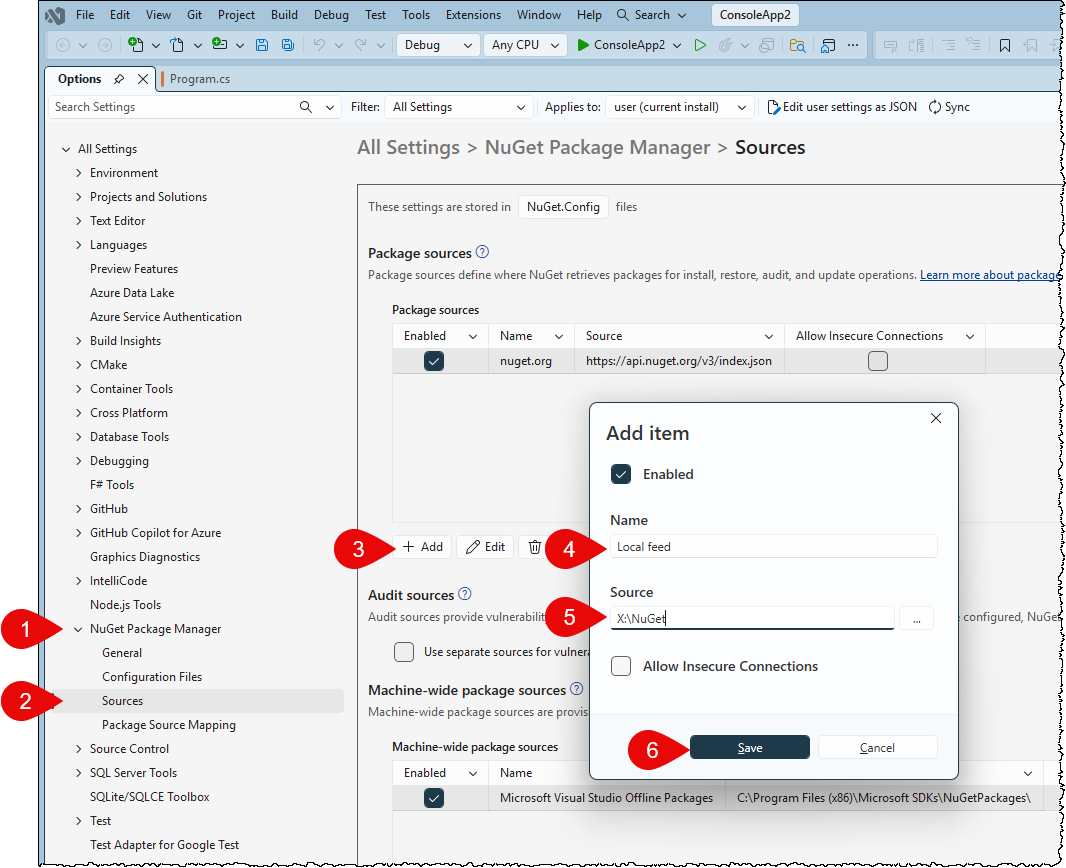
You have to enable the new feed for all or specific subset of packages:
- Select Package Source Mapping from left sidebar.
- Select the
*package pattern (default, matches all packages). - Click the Edit button.
- Check the newly added
Local Feedsource. - Click Save.
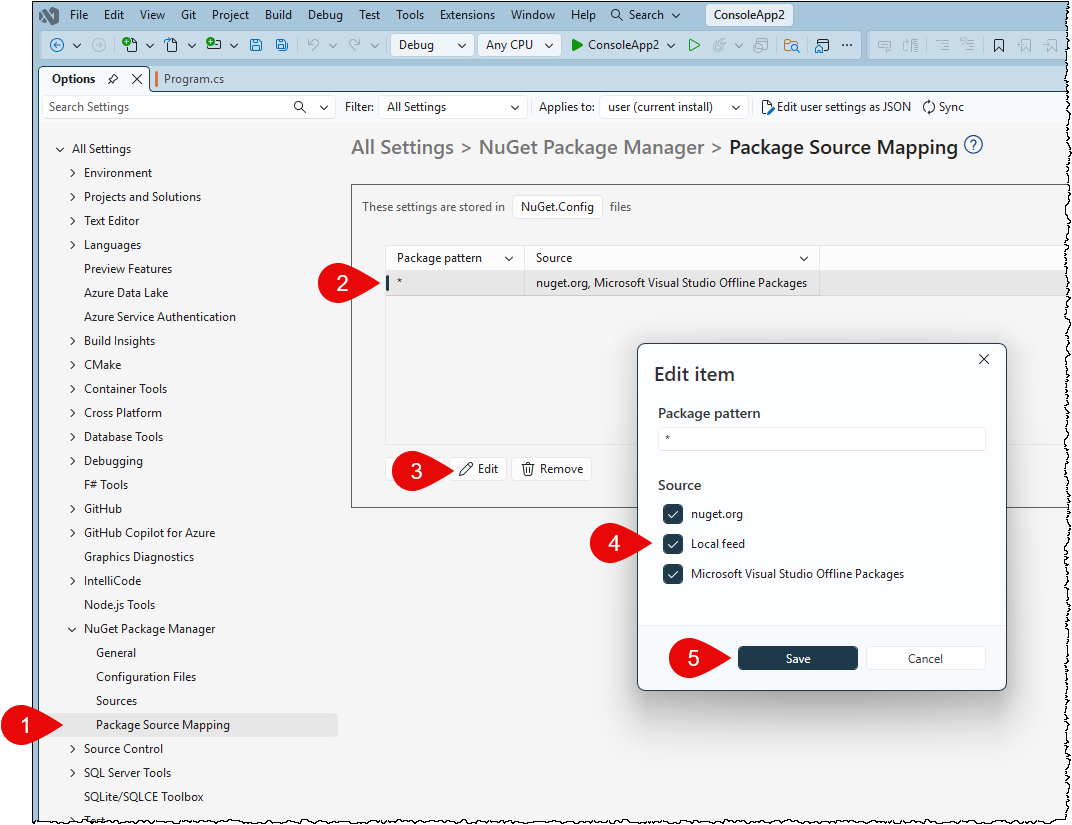
The above will allow that all NuGet packages can be added from the source. If you want only Rebex packages to be available from this feed, you can create new mapping instead with Rebex.* as a pattern and enable just this new source.
Adding custom NuGet feed using configuration files
The feeds NuGet uses to search for packages are configured using NuGet.config files. Sources can be configured on machine level, user level or folder level.
Default locations of the NuGet.config files depend on your operating system:
| Platform | Machine level | User level |
|---|---|---|
| Windows | %ProgramFiles(x86)%\NuGet\Config | %appdata%\NuGet\NuGet.Config |
| Linux | /etc/opt/NuGet/Config | ~/.config/NuGet/NuGet.Config or ~/.nuget/NuGet/NuGet.Config |
| Mac OS | /Library/Application Support | ~/.config/NuGet/NuGet.Config or ~/.nuget/NuGet/NuGet.Config |
You can add new feed by editing the appropriate file directly. See the following example for user level configuration file on Windows:
<?xml version="1.0" encoding="utf-8"?>
<configuration>
  <packageSources>
    <add key="nuget.org" value="https://api.nuget.org/v3/index.json" protocolVersion="3" />
    <add key="Local feed" value="X:\NuGet" />
  </packageSources>
  <packageSourceMapping>
    <packageSource key="nuget.org">
        <package pattern="*" />
      </packageSource>
    <packageSource key="Microsoft Visual Studio Offline Packages">
      <package pattern="*" />
    </packageSource>
    <packageSource key="Local feed">
      <package pattern="*" />
    </packageSource>
  </packageSourceMapping>
  <config>
    <add key="signatureValidationMode" value="Accept" />
  </config>
</configuration>
Other custom NuGet feeds
You can run your own NuGet server or use external services (free or paid) to do it for you. See Hosting your own NuGet feeds from learn.microsoft.com for more information about these options.
Testing the new feeds
Try to add NuGet package to your project, but add .Full suffix to its name, ie.
Install-Package Rebex.Sftp.Full
The Rebex.*.Full packages are not available in the default nuget.org feed. If the package is added successfully, the new source is configured correctly.
Never reference the default package (ie. Rebex.Sftp) and full package (ie. Rebex.Sftp.Full) in the same project, because it may cause unpredictable failures.